For Attorneys

Run traffic-ticket cases without rebuilding the story.

Start with the citation. Keep intake details, payment requests, messages, documents, and next steps on the same case record.

  • Ticket-first intake
  • Case-linked payments
  • Messages and documents in one history
Live workflow view
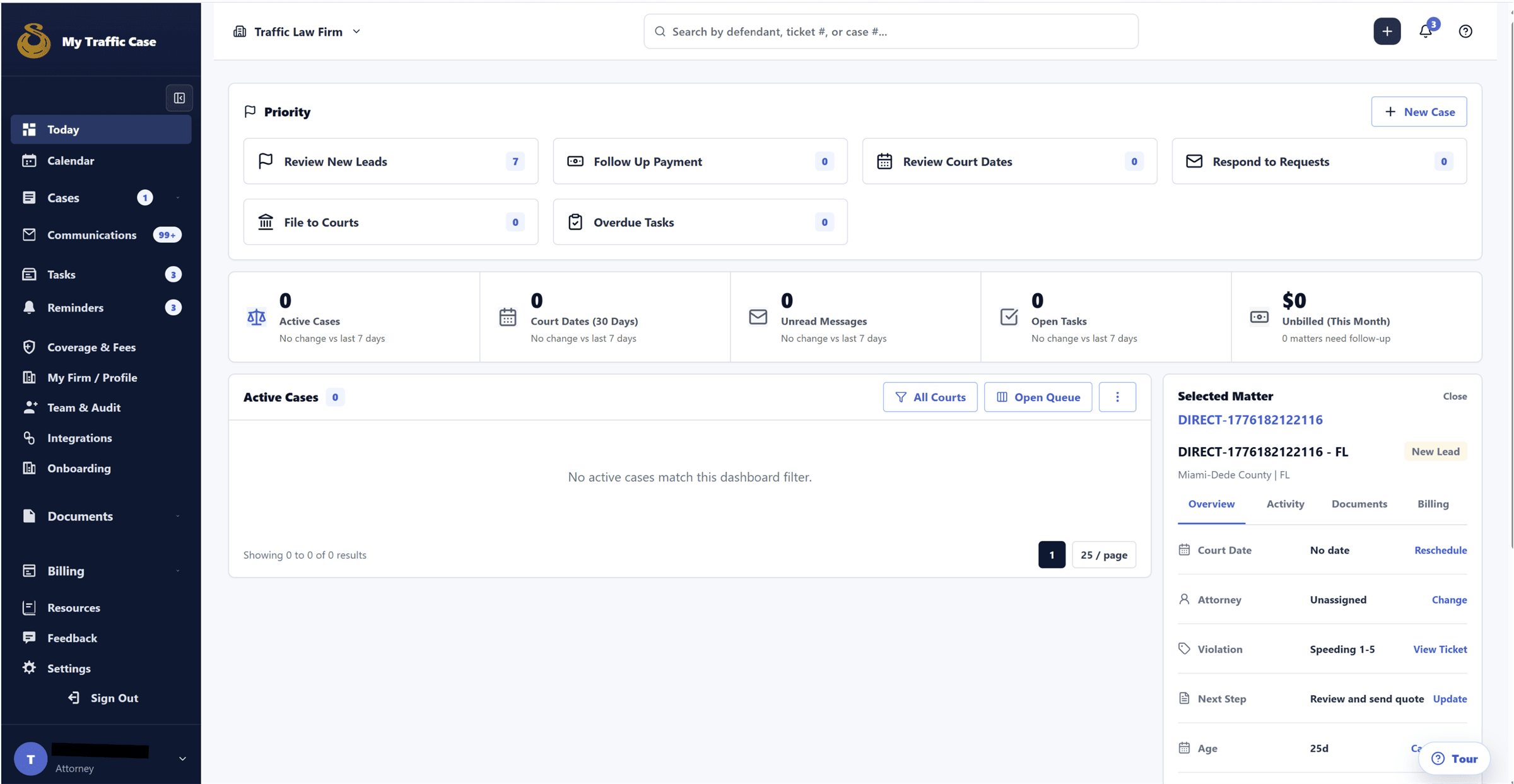
Attorney Today workspace showing priority case work, upcoming tasks, and operational metrics.

Attorney intake workspace

One workspace for intake, payment, and follow-up.

A single attorney view keeps citation details, payment status, documents, messages, and next actions connected to the same case.

  • Keep every next step attached to the case
  • Spend less time reconstructing status from separate tools

Attorney plans

A free plan that already feels like traffic-ticket software.

MyTrafficCase starts with the workflow traffic-ticket attorneys need every day. Free includes core intake, case, payment, document, and follow-up tools that broad legal platforms often reserve for paid tiers.

Free
$0/month Pay as cases create value

Core traffic-ticket workflow without a subscription.

  • Ticket-first case management
  • Branded intake and payment links
  • Calendar, reminders, documents, and 5 eSignatures/month
  • Coverage and fee settings for traffic-ticket work
  • In-profile upgrade options for selected direct-client workflows
Start Free
Most firms
Pro
$59/month 1 month free trial, cancel anytime

Higher limits and automation for attorneys growing direct-client volume.

  • Everything in Free
  • Expanded intake, OCR review, eSignature, and template limits
  • Advanced reminders and Pro automation
  • Richer reporting and integrations
  • Firm-direct workflows run under the subscription without per-case upgrade prompts
Start Pro Trial
Enterprise
$89/month Team access included

Team controls, oversight, and unlimited core client-work limits.

  • Everything in Pro
  • 1 included team member seat
  • Additional seats $39/seat/month
  • Roles, permissions, audit activity, and firm oversight
  • Unlimited documents and eSignatures
Talk Enterprise

Payment processing fees and legally required pass-through disclosures may apply.

What this fixes

The work gets messy when the case story lives in too many places.

The pain is concrete: too many inbox threads, too many spreadsheets, too much retyping, and not enough status clarity.

Ticket details get retyped.

Drivers email, fleets text, and teams copy the same citation details into the next tool.

Status questions keep coming back.

When updates live in threads, someone has to explain what moved and what is still waiting.

Payment collection drifts away.

Payment requests are harder to track when billing notes are separated from the case.

Follow-up becomes reconstruction.

The team pieces together who said what, which file arrived, and what should happen next.

How it works

From ticket upload to attorney follow-up, on one record.

Four steps. The case keeps its context as it moves from citation intake to pricing, payment, and status.

Live workflow view
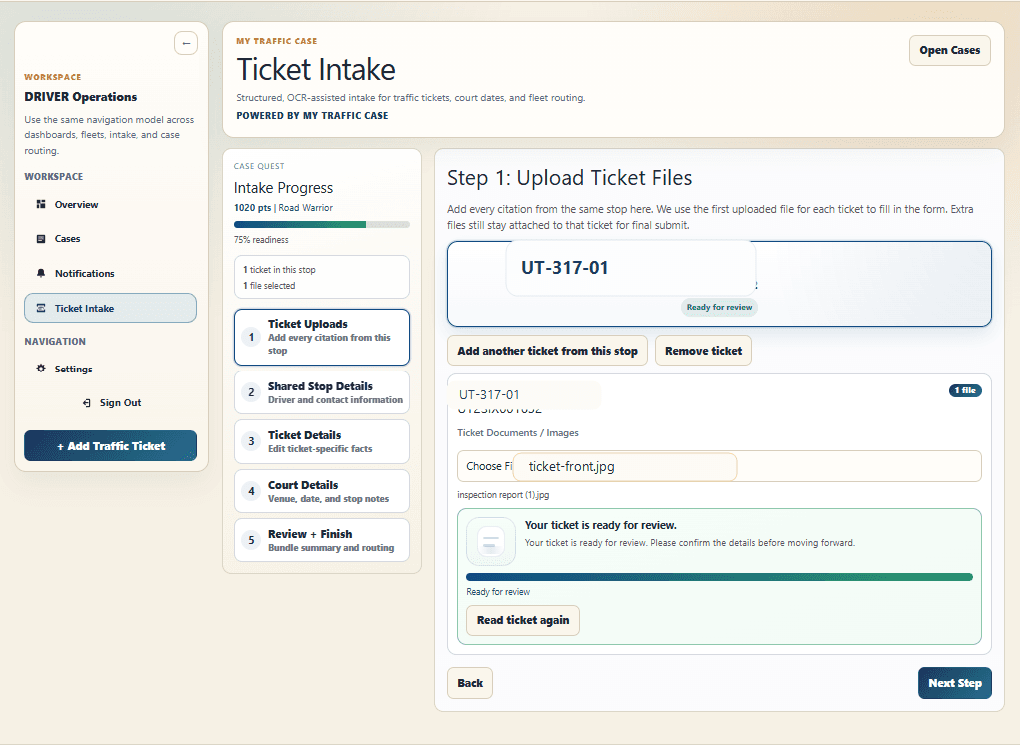
Driver ticket upload screen with ticket upload controls and review state.

Step 01

Driver uploads the ticket.

The citation starts the case record. OCR pulls citation number, court, charges, and date for driver review.

  • Use the citation as the starting point
  • OCR pulls the key fields automatically
  • Driver confirms details before the case is submitted

Who it's for

One case record. The right view for each role.

Attorneys stay in control while drivers, fleets, and agencies see the parts they need to keep the case moving.

Attorneys

Turn ticket intake, payment, and follow-up into one workflow your team can read at a glance.

Primary buyer path

Live workflow view
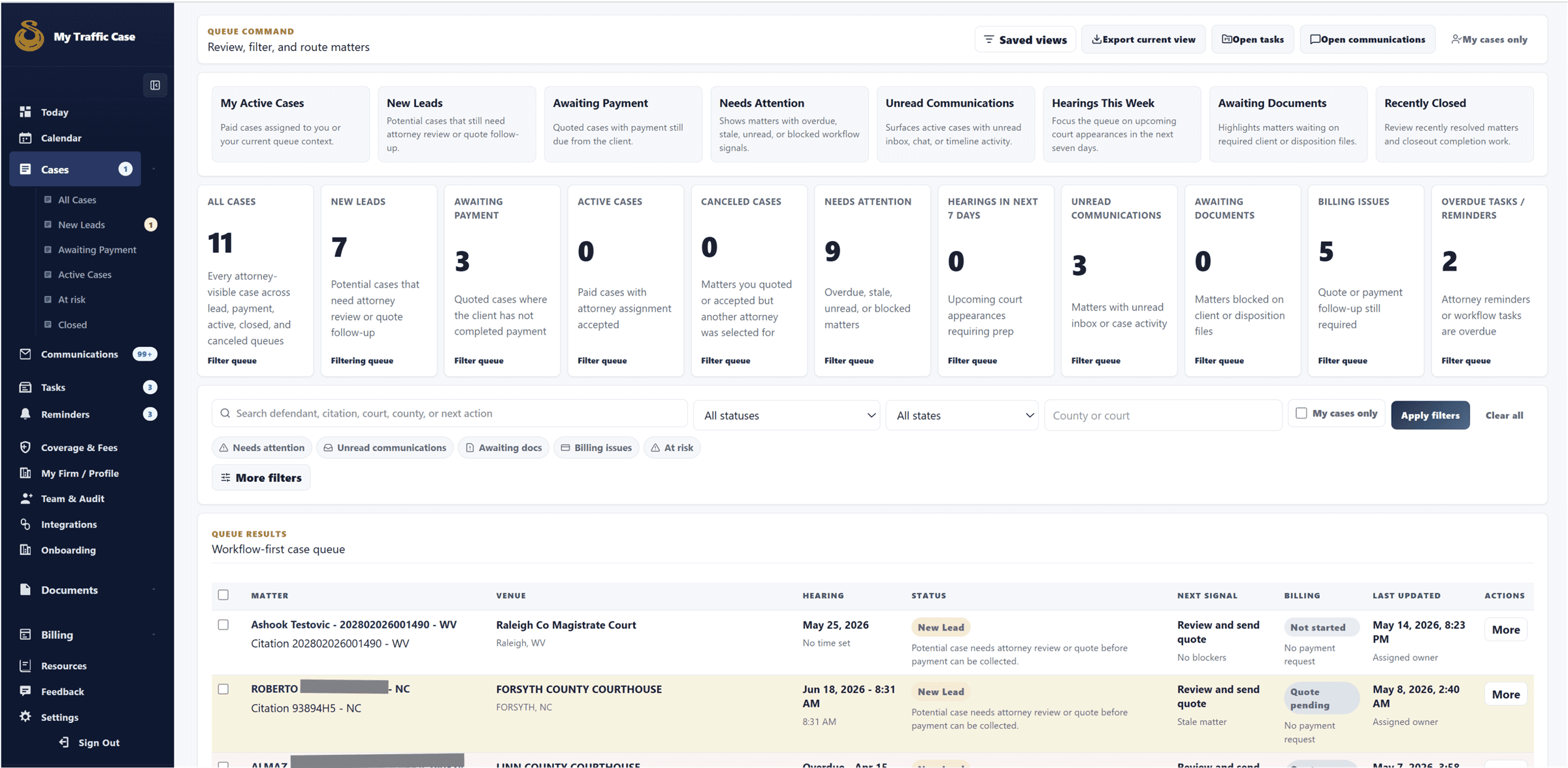
Attorney case queue showing saved views, case status, filters, and case rows.

Intake and triage

Bring new traffic-ticket cases into one intake queue.

Review the citation details, source, court, and current next action before your team starts chasing context across tools.

  • See new cases without rebuilding intake context
  • Keep direct cases and platform opportunities in one intake lane
  • Start with the ticket details instead of a blank case setup flow
1

Step 1

Start from the ticket, not a blank case form.

The citation, client details, source, and first next step land in one readable case record.

2

Step 2

Send payment requests without losing context.

Pricing and collection stay beside the ticket details, notes, and current case status.

3

Step 3

Answer status questions from the case itself.

Messages, documents, and next actions stay attached so the next person does not rebuild the story.

Before & after

The same operation, without the reconstruction work.

Each row is a workflow the product keeps connected.

The legacy stackOn MyTrafficCase

New case intake

Starts in one channel, then copied into another.

Starts from the ticket and stays on one case record.

Attorney pricing

Lives in a spreadsheet, emailed on request.

Fixed or review-based, attached to the case.

Driver updates

Driver emails, gets forwarded, waits, asks again.

Driver sees current status, open requests, and documents.

Payment collection

Payment request sent separately and chased elsewhere.

Payment request on the case, tied to the action.

Status clarity

Reconstructed from forwarded threads.

One timeline every role reads from.

Workflow integrity

Keep communication, payment, and next steps connected to the case.

The value is operational. Role-based access, case-linked history, and branded handoffs keep the work readable without adding more tools.

Access

Role-based access keeps each participant in the right lane.

Attorneys, drivers, fleets, and agencies each see the part of the case they need to move forward.

Communication

Messages stay attached to the case.

Updates, answers, and open questions live with the case instead of getting buried in inbox threads.

Client handoff

Intake and payment flows stay tied to the case.

Branded intake and payment requests keep context visible from the first submission through collection.

History

Case history stays centralized.

Documents, status, and next actions stay in one case record so the next person can understand the case quickly.

Questions

Questions attorneys ask before requesting access.

Plain answers focused on the day-to-day workflow.

Practice-management tools are generic. MyTrafficCase is structured around the traffic-ticket case itself — citation intake, OCR, jurisdiction routing, driver and fleet views, and payment collection attached to the case record. You don't build a workflow. The workflow is already the product.

Ready when you are

Bring the next traffic-ticket case into one workflow.

Request access and we will walk through how your intake, payment, and follow-up process fits.