Communications Workbench

Gmail integration for case-centered traffic-ticket communication

Gmail integration connects a Google mailbox through the attorney integrations flow so email can be imported, reviewed, linked, and used from Communications.
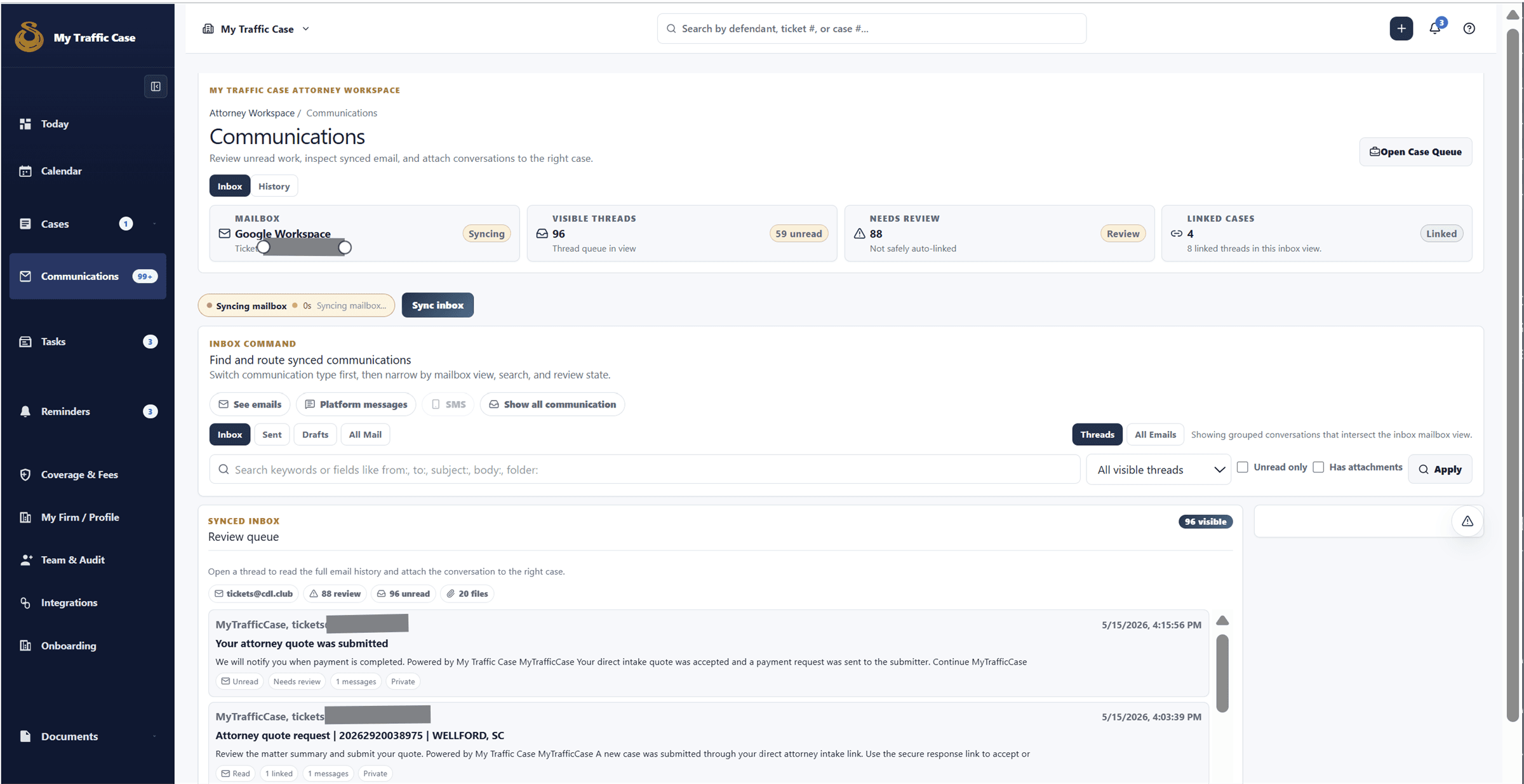
Built for attorney workspaces that manage platform messages and synced mailbox communication from the same case-aware workbench.
Sanitized attorney communications workbench showing mailbox, message, and case-linking controls.

Audience

Who it is for

Attorneys and firms that rely on Gmail for client and court-related traffic-ticket communication.

Problem

What it fixes

When Gmail threads live outside the case workflow, staff rebuild context from inbox search, forwarded messages, and separate notes.

How it works

Workflow steps

  1. The attorney starts Google sign-in from the integrations workflow.
  2. The setup flow records mailbox visibility, sync scope, folder preferences, and first import settings.
  3. Communications shows imported threads and emails with case-linking actions.
  4. Attorneys can compose case-linked updates from the platform when mailbox send rules allow it.
Workflow

Inbox to case context

Mailbox messages can be reviewed and linked so the case record carries the communication history.

  • Review inbox
  • Filter needs-review
  • Link thread or email
  • Reply from context
Workflow

Compose and follow up

Case selection, recipients, body, attachments, and drafts stay in the same workbench.

  • Choose case
  • Pick channel
  • Draft message
  • Send or save

Capabilities

What this workflow covers

  • Attorney communications workbench for case-aware platform messages and synced email.
  • Combined inbox for platform messages and synced email.
  • Mailbox connection and status banner with connect, reconnect, finish setup, review settings, recover folders, refresh folders, run sync, and open inbox actions.
  • Folder views for Inbox, Sent, Drafts, and All Mail.
  • Thread view and all-email view.
  • Search supports normal keywords plus from, to, subject, body, and folder fields.
  • Filters for unread, attachments, mailbox/account, linked case, and ownership.
  • Review desk for unlinked or needs-review email.
  • Thread reader with mark read/unread, open full thread, reply, reply all, forward, link/unlink to case, attachments, and sync metadata.
  • Individual email reader with mark read/unread, reply/reply-all/forward when threaded, link/unlink to case.
  • Compose panel for platform message or mailbox email with case, audience/channel, recipients, cc/bcc, subject, rich text body, and attachments.
  • Draft save, update, and discard controls.
  • Dedicated thread detail page with overview, case linking, compose, and message stream.

Traffic-ticket value

Why it matters for citation work

The value is keeping traffic-ticket work organized around the citation and the next case step instead of a generic matter record.

Related links

FAQ

Does MyTrafficCase use a Gmail add-on?

No. The verified product flow connects Gmail from inside MyTrafficCase, then imports and links communication into the case workflow.

Can imported emails be linked to cases?

Yes. The Communications workspace includes link and unlink actions for imported threads and individual emails.