Live workflow view
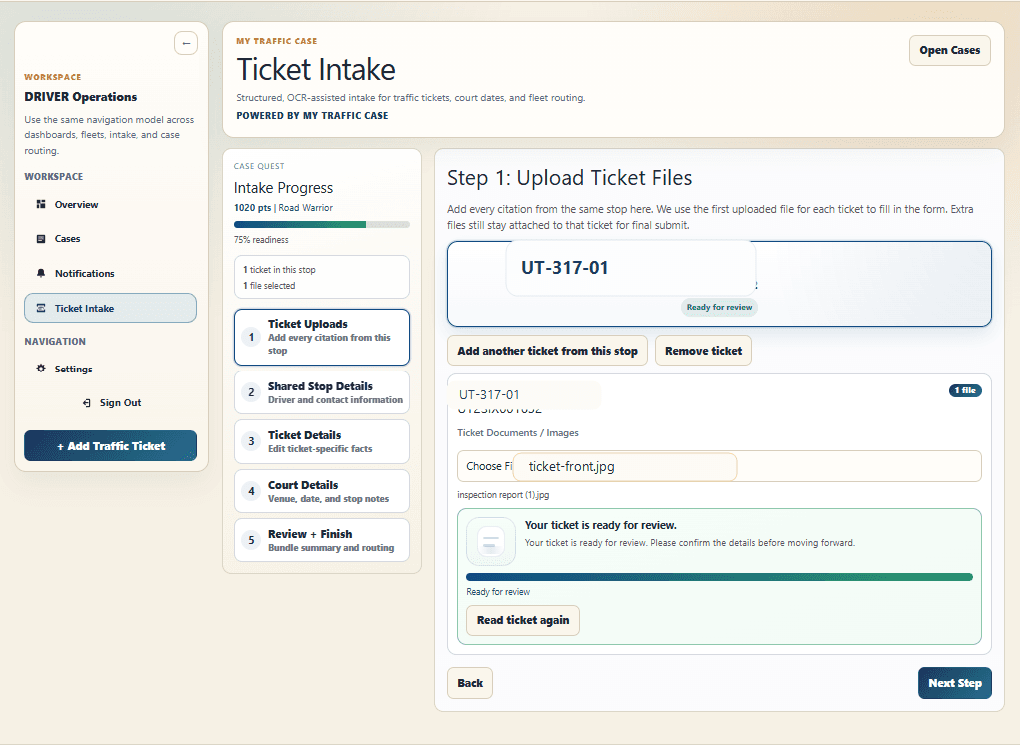
Upload
Start from the ticket.
Upload the citation and move straight into review.
- Use the citation as the starting point
- Avoid typing every detail from scratch
- Get into review quickly
For drivers
Points, insurance hikes — and if you drive for a living, your CDL and your job. Snap a photo of your citation, get matched with a licensed attorney in your county, and see one flat, all-in price before you decide anything. Courts only give you a short window to respond, so start now.
Upload
Upload the citation and move straight into review.
What a ticket really costs
Paying the ticket means pleading guilty — and the conviction is what costs you, year after year.
A conviction can add points that follow your license for years and stack toward a suspension.
Insurers reprice you at renewal after a conviction. That increase usually costs more than the fine itself, every year.
For commercial drivers, a moving violation can mean employer notifications, lost loads, or a career-ending mark. CDL tickets are different — fight them like it.
Your citation has a response deadline. The sooner an attorney is on it, the more options they have to work with.
Product walkthrough
Upload the citation, confirm what the OCR extracted, and get matched with a local attorney — with one flat, all-in price shown before you commit.
Upload
Upload the citation and move straight into review.
Why fight it here
Compare what actually happens when you pay, versus when a local attorney fights it for one flat price.
Pleading guilty puts the conviction and points on your record.
Your attorney works to reduce or dismiss the charge before it ever becomes a conviction.
Your insurer can raise your premium at every renewal for years.
No conviction, nothing for your insurer to reprice.
Court forms, phone queues, and maybe a day in court.
Upload a photo in about a minute. In many courts your attorney handles the appearance.
The fine looks cheap until the years of increases land on top.
One flat, all-in price — shown before you decide, with no hourly billing.
FAQ
Straight answers about price, process, and what happens next.
You see one flat, all-in price after a local attorney reviews your ticket — before you commit to anything. No hourly billing, no surprise add-ons. If you decide not to move forward, you pay nothing.
Driver start
Upload a photo of your citation now — see your flat price and decide with a local attorney already on your side.
