For attorneys

Turn ticket intake, payment, and follow-up into one workflow.

Use one traffic-ticket workflow for self-sourced cases and platform opportunities. Send intake and payment links, keep documents and communication tied to the case, and make the next step easy to see.

  • Ticket-first intake instead of generic case setup
  • Pricing and payment requests tied to the case
  • Documents, communication, and follow-up in one case history
Live attorney workflow
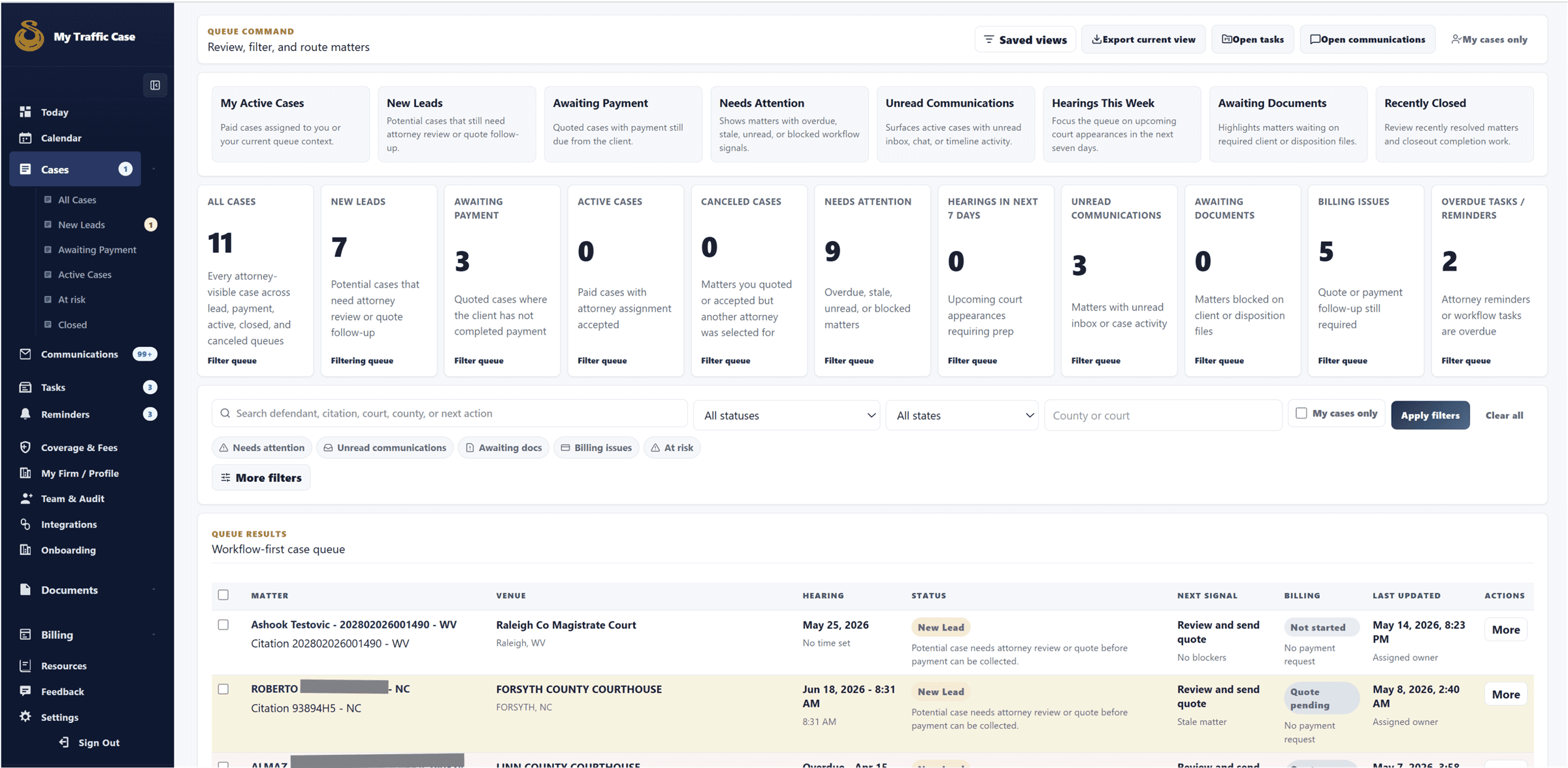
Attorney case queue showing saved views, case status, filters, and case rows.

Intake and triage

Bring new traffic-ticket cases into one intake queue.

Review the citation details, source, court, and current next action before your team starts chasing context across tools.

  • See new cases without rebuilding intake context
  • Keep direct cases and platform opportunities in one intake lane
  • Start with the ticket details instead of a blank case setup flow

Attorney plans

A free plan that already feels like traffic-ticket software.

MyTrafficCase starts with the workflow traffic-ticket attorneys need every day. Free includes core intake, case, payment, document, and follow-up tools that broad legal platforms often reserve for paid tiers.

Free plan value

Core traffic-ticket tools are included before you pay for software.

Intake, case workspace, payment links, reminders, documents, and starter eSignature support are available on Free so attorneys can prove the workflow with real ticket volume first.

  • Ticket-first intake
  • Branded intake link
  • Payment links
  • Calendar and reminders
Included free
Free

$0/monthPay as cases create value

Core traffic-ticket workflow without a subscription.

Solo attorneys starting direct-client intake, ticket review, and case-linked payments.

Run cases

  • Today dashboardA daily view of new cases, open follow-ups, payments, reminders, and the next case actions that need attention.
  • Cases queueOne queue for self-sourced traffic-ticket cases and eligible platform opportunities.
  • Matter workspaceA case record that keeps ticket details, notes, documents, payment status, communication, and next actions together.

Bring in clients

  • Branded intake linkA firm-facing intake link clients can use to start a traffic-ticket case without calling or emailing details first.
  • Intake/OCR reviewTicket upload and review workflow that helps turn citation details into usable case context before attorney action.
  • Coverage and feesSettings for traffic-ticket counties, courts, service coverage, and fee expectations.

Collect and follow up

  • Quote reviewReview case context and fee before moving the client into payment or next-step follow-up.
  • Payment linksCase-linked payment requests so collection status stays visible from the matter.
  • Basic documentsStore and request supporting files needed for routine traffic-ticket representation.
  • 5 eSignatures/monthStarter signature requests for common representation documents and client authorizations.
Start Free
Most firms
Pro

$59/month1 month free trial, cancel anytime

Higher limits and automation for attorneys growing direct-client volume.

Firms ready to reduce repeated intake, collection, and reminder work.

Expand volume

  • Higher intake limitsMore direct-client and workflow capacity for firms handling steady ticket volume.
  • Expanded OCR reviewHigher review capacity for extracting and confirming citation details from uploaded tickets.
  • Reusable eSignature templatesSave common traffic-ticket signature documents as templates instead of rebuilding them case by case.

Automate follow-up

  • Court-date remindersFollow-up reminders tied to court dates and case deadlines.
  • Collection remindersAutomated follow-up around unpaid or pending payment requests.
  • Direct-client workflow automationAutomation for intake, reminders, payment handoff, and repeated traffic-ticket case steps.

See performance

  • Intake source reportingSee where traffic-ticket cases are coming from and how direct-client channels perform.
  • Payment status visibilityTrack requested, paid, and pending collections from the same case workflow.
  • Email and calendar integrationsConnect common firm tools so communication and reminders stay closer to the matter.
Start Pro Trial
Team plan
Enterprise

$89/monthTeam access included

Team controls, oversight, and unlimited core client-work limits.

Firms with attorneys, paralegals, and intake staff sharing the same queue.

Coordinate teams

  • Shared case queueTeam-wide visibility into active traffic-ticket cases, intake status, next actions, and handoffs.
  • 1 included team seatEnterprise includes team access so another firm user can work inside the shared workflow.
  • Additional seats availableAdd more users for attorneys, intake staff, paralegals, or operations support as the firm grows.

Control access

  • Custom rolesRole setup for attorneys, staff, and firm operators who need different levels of access.
  • PermissionsControl who can view, update, assign, and manage traffic-ticket case work.
  • Audit activityVisibility into important account and case actions for team accountability.

Scale client work

  • Unlimited documentsUnlimited document storage and management for core traffic-ticket client work on the highest plan.
  • Unlimited eSignaturesUnlimited eSignature usage for core traffic-ticket documents on the highest plan.
  • Priority onboardingHigher-touch setup support for firms rolling the workflow out to a team.
Talk Enterprise
See all featuresOpen the full plan comparison with feature definitions and limits.

Compare plans in detail

See what each plan includes for traffic-ticket work.

Use the detail view to compare the workflow areas attorneys ask about most: intake, payment, documents, follow-up, reporting, integrations, and team controls.

Get organized

Case management

Matter workspace, status, notes, tasks, and case history for active traffic-ticket work.

Included

Included

Included

Traffic-ticket intake

Ticket-first intake built around citation details, driver information, court context, and review.

Included

Expanded

Unlimited

Coverage and fee settings

County, court, and fee configuration that helps route and price routine traffic-ticket work.

Included

Included

Included

Get paid

Quote review

Review the case and fee before sending the payment request or moving the case forward.

Included

Advanced

Unlimited

Payment links

Case-linked payment requests that keep collection status visible with the matter.

Included

Included

Unlimited

Collection visibility

At-a-glance status for what has been requested, paid, or still needs follow-up.

Basic

Expanded

Firm oversight

Client work

Communication history

Messages, updates, and follow-up context stay attached to the case record.

Included

Included

Team visible

Documents

Store, request, and manage supporting files from the traffic-ticket matter workspace.

Basic

Expanded

Unlimited

eSignature

Send signature requests and reuse templates for common traffic-ticket documents.

5/month

Higher limits

Unlimited

Operations

Calendar and reminders

Court dates, follow-up reminders, and open tasks kept close to the case.

Included

Advanced

Unlimited

Reporting

Visibility into intake sources, open cases, payment status, and workflow health.

Basic

Expanded

Firm oversight

Integrations

Connected email, calendar, and workflow integrations for attorney operations.

Selected

Expanded

Unlimited

Firm controls

Team access

Shared access for attorneys, paralegals, intake staff, and support team members.

Single user

Single user

Team included

Roles and permissions

Control who can view, update, assign, and audit firm traffic-ticket work.

Limited

Limited

Custom controls

Support and onboarding

Help getting the firm set up around direct-client and platform case workflows.

Standard

Guided

Priority

Payment processing fees and legally required pass-through disclosures may apply.

Why attorneys choose MyTrafficCase

A traffic-ticket workflow beats a generic matter database.

Traffic-ticket firms need speed, payment clarity, and clean follow-up. MyTrafficCase keeps those steps connected from the ticket upload through the next client update.

Ticket-first intake

Start with the citation, not a blank matter.

The workflow is built around ticket details, court context, driver information, and the review step that traffic-ticket cases need first.

  • Intake/OCR review
  • Court and citation context
  • Direct-client intake links

Faster handoff

Move from quote review to payment without losing context.

Pricing, payment links, and collection status stay attached to the case so intake does not turn into a separate billing chase.

  • Quote review
  • Payment links
  • Collection visibility

One queue

Handle self-sourced and platform cases together.

Attorneys can review direct-client work and platform opportunities from the same operational view instead of splitting traffic-ticket work across tools.

  • Today dashboard
  • Cases queue
  • Matter workspace

Client follow-up

Keep updates, documents, and signatures tied to the case.

Communication history, supporting files, document requests, and eSignature activity stay with the case record the team already uses.

  • Case-linked messages
  • Documents
  • eSignatures

Deadline discipline

Make the next action visible before the case stalls.

Calendar items, reminders, tasks, and current status help the team see what still needs attention after intake and payment.

  • Calendar
  • Reminders
  • Tasks and next actions

Team accountability

Give growing firms shared visibility and controls.

Enterprise adds team access, role controls, audit activity, and firm oversight for practices with more than one person touching traffic-ticket cases.

  • Team roles
  • Audit activity
  • Firm oversight

Attorney features

What attorneys can do on the platform.

Core case work, intake, payments, client follow-up, and firm operations stay connected without exposing the full internal resource library publicly.

Case management

Run case work from Today and Cases.

Triage active work, open matters, track status, and keep notes and tasks close to the case.

  • Today dashboard
  • Cases and case workspace
  • Status, notes, tasks, and next actions

Intake and payments

Bring in direct clients and collect cleanly.

Use branded intake, quote review, payment links, and direct-client case setup without rebuilding context.

  • Branded intake link
  • Quote review and payment links
  • Direct-client case setup

Client work

Keep client communication and documents tied to the matter.

Manage communications, document requests, client portal context, and eSignature workflows from the case.

  • Communications and client portal
  • Document requests
  • eSignatures and reusable templates

Practice operations

Keep firm operations in the same workspace.

Use calendar, reminders, coverage and fees, integrations, team audit, and authenticated resources.

  • Calendar, reminders, coverage and fees
  • Integrations and team audit
  • Authenticated attorney resources

Product walkthrough

See the attorney workflow from intake to follow-up.

A simple sequence for the work attorneys and support teams manage every day.

Live attorney workflow
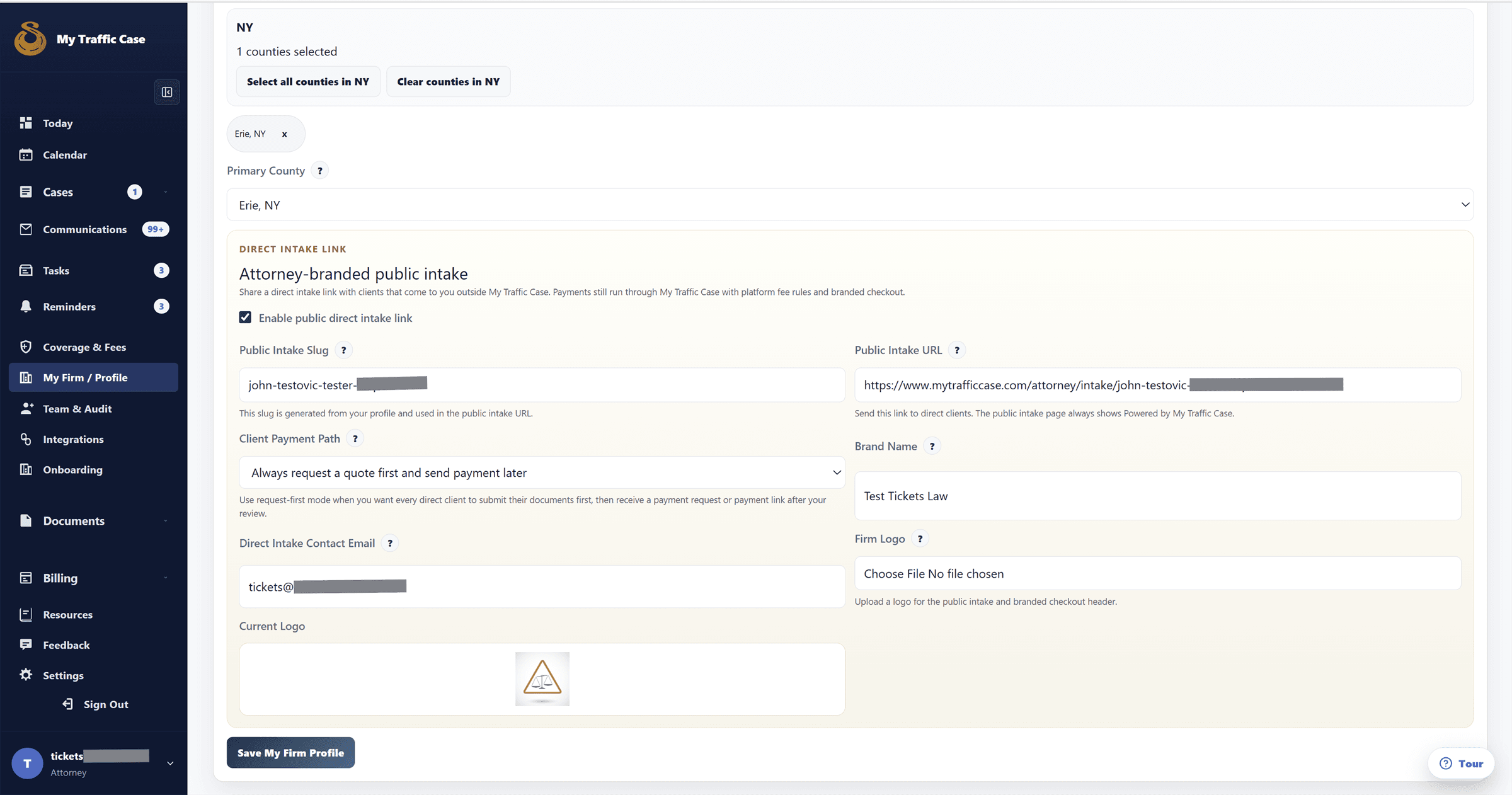
Attorney branded intake setup page showing direct intake link settings.

Intake

Start from the ticket and move the case into one case workflow.

New cases arrive with the citation details, client information, and source already tied to the same record your team will use next.

  • Reduce repeated data entry at the start of the case
  • Keep intake context visible for whoever works the case next
  • Support both self-sourced cases and platform-sourced opportunities

Compare software

Why MyTrafficCase is the best legal software for your traffic-ticket practice.

Broad legal software can organize many practice areas. MyTrafficCase is built around the traffic-ticket operating model: ticket-first intake, fast quote-to-payment handoff, direct-client growth, and case-linked follow-up.

Broad legal software vs. MyTrafficCase

Traffic-ticket firms need a high-volume workflow where the citation, pricing decision, payment request, documents, and next action stay connected.

WorkflowBroad legal softwareMyTrafficCase

Practice fit

Built to support many matter types, which can make traffic-ticket work feel like a generic case setup process.

Purpose-built around traffic tickets, citations, courts, drivers, direct intake, and fast case handoff.

Ticket-first intake

Often begins with generic contact and matter fields before the ticket context is complete.

Starts from the citation and keeps ticket details, court context, intake/OCR review, and source attached to the matter.

Quote-to-payment

Billing can live in a separate workflow from intake, leaving staff to chase payment status elsewhere.

Keeps quote review, payment links, collection status, and client follow-up visible inside the same case workflow.

Direct-client growth

May require extra setup or separate tools to turn a traffic-ticket inquiry into a clean intake path.

Gives firms branded intake links, coverage and fee settings, direct-client workflows, and platform opportunities in one queue.

Patched-together tools vs. MyTrafficCase

A traffic-ticket practice loses time when intake, payments, signatures, reminders, and status updates live in different places.

WorkflowPatched-together toolsMyTrafficCase

Manual entry

Ticket details get copied into forms, inbox follow-up, billing notes, spreadsheets, and status trackers.

The same traffic-ticket context moves from intake to pricing, collection, documents, and follow-up.

Client communication

Status questions and document requests get scattered across email, text, and side notes.

Messages, documents, eSignatures, reminders, and current status stay readable from the case.

Team accountability

Growing firms need separate audits or manual check-ins to know who owns the next step.

Enterprise adds team access, role controls, audit activity, and firm oversight for case assignments and follow-up ownership.

FAQ

Questions attorneys ask before requesting access

Focused answers for firms deciding whether the workflow fits their practice.

No. The workflow is designed for both self-sourced cases and platform-sourced opportunities, so firms can keep both in the same case flow.

Request access

Request attorney access and review the workflow with your firm in mind.

Start the attorney access review, then bring intake, collection, and follow-up into one case-centered workflow.