Platform

Complete traffic-ticket case management feature catalog

Explore the full attorney workflow: access and onboarding, Today, case queues, case workspace, communications, calendar, tasks, payments, documents, eSignature, integrations, direct intake, team controls, resources, fleets, agencies, and drivers.
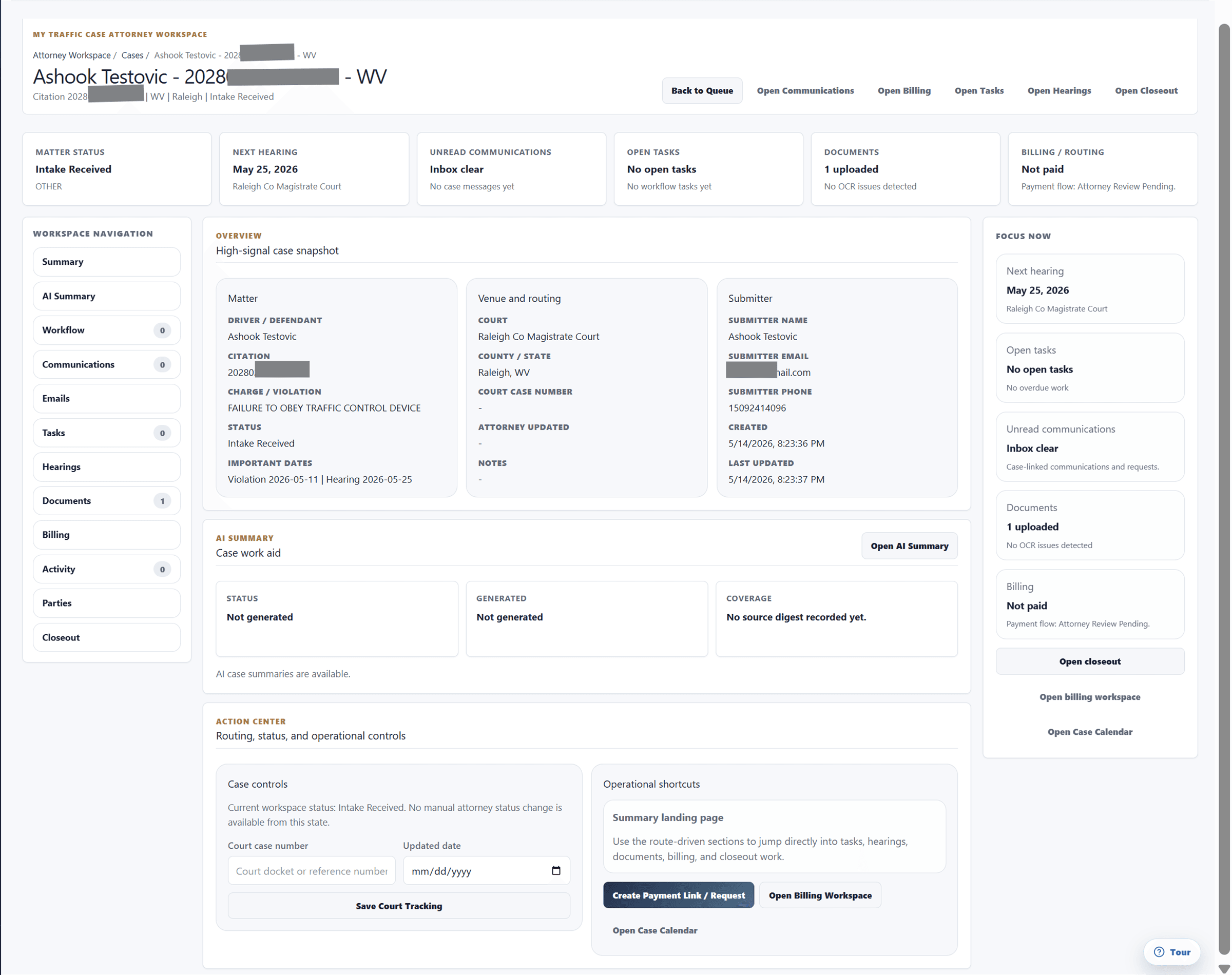
Sanitized MyTrafficCase attorney case workspace showing case sections and action center.

Onboarding

Attorney Access & Onboarding

Invite-based attorney access, public access requests, outreach responses, firm setup, coverage, fees, and agreement acceptance.

Sanitized coverage and fees settings showing county coverage and pricing controls.
Available for attorney workspaces with request, invite, and outreach access paths.

Workflow

Move an attorney from access request or invite into a traffic-ticket workspace with identity, office, billing, coverage, fee mode, CDL acceptance, vacation mode, and agreement details captured.

Access request to workspace

Public request and invite paths route attorneys into the onboarding and login flow.

  • Request access
  • Accept invited opportunity
  • Finish attorney identity
  • Enter workspace

Coverage and pricing setup

Coverage and fee choices become operational context for intake, quote review, and case routing.

  • Set states/counties
  • Choose primary county
  • Select fee mode
  • Update CDL/vacation availability

Included capabilities

  • Invite-based attorney login and redirect flow.
  • Public attorney access request flow.
  • Tokenized case outreach response links to accept or decline attorney opportunities.
  • Attorney identity and contact details.
  • Office address with state and county setup.
  • Firm billing profile.
  • Coverage states, coverage counties, and primary county.
  • CDL acceptance and vacation mode.
  • Fee mode for global flat fee, county-specific fees, or quote-required work.
  • Attorney agreement review with checkbox acceptance and typed signature.
  • Ability to reopen or edit onboarding-derived firm and coverage details.

Today

Today Dashboard

A workday dashboard for priority case work, active matters, court dates, messages, tasks, unbilled work, and availability.

Sanitized attorney Today dashboard showing priority work cards, metrics, and active matters.
Available for attorney workspaces with the relevant case, billing, communications, and reminder data.

Workflow

Start the attorney day from priority signals, KPIs, active matters, selected matter panels, and quick actions instead of searching across several work areas.

Triage the day

Priority cards and KPI counts show where attorney attention should go first.

  • Review priority cards
  • Check court dates
  • Open unread messages
  • Address overdue work

Act from the selected matter

The selected matter panel keeps case facts and actions near each other.

  • Review overview
  • Open activity
  • Check documents
  • Open billing state

Included capabilities

  • Attorney workday dashboard with priority action cards.
  • KPI rail for active cases, upcoming court dates, unread messages, open tasks, and unbilled work.
  • Active matters table with court, violation, status, next step, and age.
  • Selected matter panel with Overview, Activity, Documents, and Billing tabs.
  • Quick actions for quote, court filing, messaging, discovery, billing, plea negotiation, tasks, document upload, and more actions.
  • Workday signals for court dates, messages needing response, deadlines, unbilled cases, and overdue tasks.
  • Availability controls for CDL acceptance and vacation mode.

Cases

Case Management

Attorney case queues, saved views, filters, quick status updates, CSV import, CSV export, and bulk workflows for high-volume ticket work.

Sanitized attorney case queue showing saved views, filters, status columns, and matter rows.
Built for attorney workspaces managing high-volume traffic-ticket case queues.

Workflow

Keep every ticket matter in a case queue that exposes venue, hearing, status, communication, document, billing, next action, ownership, and update state.

Queue review

Saved views and filters separate new leads, payment follow-up, active work, risk, closeout, and archive lanes.

  • Choose view
  • Filter cases
  • Check next action
  • Open workspace

Bulk case operations

Bulk workflows reduce repeated status, reminder, payment, and document-request work.

  • Select matters
  • Apply status
  • Create reminders
  • Request documents

Included capabilities

  • Tabs and views for all cases, new leads, awaiting payment, active cases, at risk, canceled, closed, and archived cases.
  • CSV bulk import workflow for moving existing case data into the attorney queue.
  • Saved views, filters, search-style view parameters, mine-only toggle, and CSV export.
  • Case table shows matter, venue, hearing, status, next action, communication state, document state, billing state, and last update.
  • Quick status updates directly from the case list.
  • Bulk status update, mark reviewed, mark paid offline, create reminders, and request documents workflows.
  • Attorney CSV case import template and upload workflow.

Workspace

Case Workspace

A case-centered workspace with summary, AI summary, workflow, communications, emails, tasks, hearings, documents, billing, activity, parties, and closeout.

Sanitized attorney case workspace showing summary, action center, and case sections.
Built for attorney case workspaces with case facts, activity, documents, billing, and follow-up in one matter record.

Workflow

Keep attorney case work anchored to the citation while exposing the sections and shortcuts needed for status, court, payment, client, fleet, document, and closeout decisions.

Review before action

Summary and focus areas keep case posture, billing, documents, dates, and messages readable before the attorney acts.

  • Review case facts
  • Check next step
  • Open required section
  • Complete action

Closeout discipline

Disposition and post-court obligations stay attached to the matter instead of becoming a separate checklist.

  • Record outcome
  • Attach disposition document
  • Track obligations
  • Complete closeout

Included capabilities

  • Shared attorney case workspace sections for Summary, AI Summary, Workflow, Communications, Emails, Tasks, Hearings, Documents, Billing, Activity, Parties, and Closeout.
  • Header shortcuts for messaging, billing, AI driver statement or summary, tasks, hearings, and closing a case.
  • Summary action center for status, court case number, attorney date, payment link, driver access, and fleet case monitoring.
  • AI case summary workflow to generate, refresh, clear, or view cached summaries.
  • AI summary inputs can include case facts, notes, messages, documents, document requests, tasks, email threads, and activity.
  • AI output can include posture, timeline, critical dates, risks, next steps, missing items, and a client-update draft.
  • Workflow steps can be marked complete or reopened, with primary attorney step controls and jury or trial-prep panel where applicable.
  • Communications actions for agency, fleet, attorney, driver, all participants, quote/update requests, signed document requests, and participant invites.
  • Emails section for linked threads, filters, and email context associated with the case.
  • Tasks, hearings, documents, billing, parties, and closeout sections keep follow-up, court, files, payments, metadata, disposition, and post-court obligations together.
  • Closeout supports structured requirements plus legacy logistics for mailed fines, payment cashed, FedEx received, checks, tracking, and broker closeout.

Communications

Communications Workbench

Combined platform messages and synced email with mailbox setup, folder views, search operators, review desk, readers, replies, forwarding, case links, and drafts.

Sanitized attorney communications workbench showing mailbox, message, and case-linking controls.
Built for attorney workspaces that manage platform messages and synced mailbox communication from the same case-aware workbench.

Workflow

Bring email and platform communication into a case-aware workbench so threads, individual emails, attachments, replies, and review queues can be linked to ticket matters.

Inbox to case context

Mailbox messages can be reviewed and linked so the case record carries the communication history.

  • Review inbox
  • Filter needs-review
  • Link thread or email
  • Reply from context

Compose and follow up

Case selection, recipients, body, attachments, and drafts stay in the same workbench.

  • Choose case
  • Pick channel
  • Draft message
  • Send or save

Included capabilities

  • Attorney communications workbench for case-aware platform messages and synced email.
  • Combined inbox for platform messages and synced email.
  • Mailbox connection and status banner with connect, reconnect, finish setup, review settings, recover folders, refresh folders, run sync, and open inbox actions.
  • Folder views for Inbox, Sent, Drafts, and All Mail.
  • Thread view and all-email view.
  • Search supports normal keywords plus from, to, subject, body, and folder fields.
  • Filters for unread, attachments, mailbox/account, linked case, and ownership.
  • Review desk for unlinked or needs-review email.
  • Thread reader with mark read/unread, open full thread, reply, reply all, forward, link/unlink to case, attachments, and sync metadata.
  • Individual email reader with mark read/unread, reply/reply-all/forward when threaded, link/unlink to case.
  • Compose panel for platform message or mailbox email with case, audience/channel, recipients, cc/bcc, subject, rich text body, and attachments.
  • Draft save, update, and discard controls.
  • Dedicated thread detail page with overview, case linking, compose, and message stream.

Calendar

Calendar & Docketing

Attorney calendar, Google/Microsoft calendar sync, conflict detection, docket views, event editing, reminders, buffers, recurrence, warnings, and calendar preferences.

Sanitized attorney calendar showing docketing, scheduled work, and calendar controls.
Built for attorney workspaces that connect calendar providers and manage docketing from case context.

Workflow

Manage court dates, hearings, deadlines, reminders, follow-ups, prep, travel, and private time from a legal scheduling surface tied back to case work.

Docket and prepare

Case-linked calendar items keep court, prep, reminder, and follow-up work connected.

  • Create event
  • Link case
  • Set reminders
  • Open matter from event

Sync and avoid conflicts

Connected calendars can import/export events and surface scheduling conflicts.

  • Connect provider
  • Run sync
  • Review warnings
  • Adjust buffers

Included capabilities

  • Attorney calendar feature with status rail for connection, coverage, and profile readiness.
  • Calendar sync support for Google and Microsoft calendars.
  • Conflict detection for synced calendar events.
  • Views include month, week, day, agenda, case timeline, and team calendar.
  • Event types include court appearance, hearing, filing deadline, internal deadline, reminder, follow-up, document review, payment reminder, case prep, trial prep, and blocked/private time.
  • Event create/edit workflow for title, type, date/time, all-day, linked case, assigned user, visibility, status, reminder offsets, court/location details, meeting URL, reference link, prep/travel buffers, recurrence, and notes.
  • Option to sync or update case court date.
  • Event detail actions for duplicate, complete, delete/cancel, and open linked case.
  • Scheduling warnings for outside working hours, overlaps, private time conflicts, and prep/travel buffer conflicts.
  • Calendar preferences for timezone, default hearing duration, prep/travel buffer, notice window, default reminders, and working hours by day.

Reminders

Tasks & Reminders

Case-linked attorney tasks, reminders, notification inbox, workflow reminder automation, delivery channels, offsets, timezone, and quiet hours.

Sanitized attorney reminder automation settings showing channels, timing, and workflow controls.
Built for attorney workspaces that need case-linked tasks, reminder rules, and follow-up visibility.

Workflow

Convert next steps into case-linked work items and reminders so deadlines, payment follow-up, missing documents, and internal actions do not disappear into notes.

Create the next step

Tasks and reminders make follow-up explicit from the case workflow.

  • Choose case
  • Set priority
  • Pick due date
  • Track completion

Automate reminder rules

Workflow settings let firms tune reminder channels and timing.

  • Choose workflow
  • Set channels
  • Set offsets
  • Respect quiet hours

Included capabilities

  • Attorney task page for case-linked tasks.
  • Task creation with title, priority, due date, and case.
  • Open and completed task views.
  • Complete or delete/cancel tasks and link back to cases or work items.
  • Attorney reminders page for case-linked reminders.
  • Upcoming, overdue, and completed reminder views.
  • Complete or delete/cancel reminders.
  • Notification inbox with per-notification and mark-all-read actions.
  • Reminder automation settings for per-workflow preferences.
  • In-app and email channel configuration.
  • Reminder offsets, timezone, quiet hours, and delivery status handling.

Billing

Billing & Payments

Payment requests, hosted payment links, direct-client billing matters, fee breakdowns, payout history, billing analytics, Stripe Connect, branding, offline payment handling, and LawPay settings.

Sanitized quote request email generated from direct intake.
Built for attorney billing workflows with payment provider setup, hosted links, payout visibility, and branded checkout controls.

Workflow

Create and monitor payment requests from case or billing context so amounts, due dates, client delivery, payment links, payout state, and collection follow-up stay attached to the matter.

Request payment from case context

The payment request carries case, client, amount, due date, and delivery context.

  • Select case
  • Enter amount
  • Choose delivery
  • Copy/open hosted link

Resolve provider blockers

Stripe setup and payout state stay visible so billing blockers do not hide from case work.

  • Start onboarding
  • Refresh status
  • Review requirements
  • Open provider dashboard

Included capabilities

  • Attorney billing workspace with Create Request, Requests, Payout History, and Settings views.
  • Create payment request workflow for existing case or manual/direct-client billing matter.
  • Amount, due date, payment link vs request-only mode, client name, email, phone, state, court, county, matter type, optional client message, internal notes, and optional email delivery.
  • Payment request tracking for status, due date, paid date, email delivery, and payment page URL.
  • Attorney fee, platform fee, card fee, platform retention, attorney payout, fee payer labels, and payout status.
  • Copy/open hosted payment page and sync pending Stripe status.
  • Offline payment handling for cases.
  • Payout history by case.
  • Billing analytics dashboard with MTD/YTD payout metrics, payment counts, Stripe/LawPay payout stats, refunds, service/product breakdowns, and recent payout payments.
  • Stripe Connect setup to start/resume onboarding, refresh payout status, open Stripe dashboard, and display requirements due or payout blockers.
  • Billing settings for platform fee payer, Stripe processing fee payer, checkout branding, public business name, support email/phone, website, statement descriptor, colors, logo, icon, and retry/sync Stripe branding.
  • LawPay merchant ID and settings support.

Documents

Documents & eSignatures

Case documents, uploads, OCR, document requests, templates, PDF field editing, merge templates, eSignature requests, dashboards, reminders, countersignatures, audit evidence, and signed records.

Sanitized eSignature request workflow showing signer fields and request controls.
Built for attorney document workflows that need templates, merge fields, eSignatures, signed records, and audit evidence.

Workflow

Keep supporting files, template outputs, signature packets, request status, audit evidence, and generated documents attached to the traffic-ticket case.

Prepare reusable templates

Templates let firms reuse representation documents and merge fields instead of rebuilding packets.

  • Upload template
  • Place fields
  • Assign signer roles
  • Preview output

Send and monitor signature requests

Requests stay visible by status and remain connected to case documents.

  • Select case or lead
  • Confirm signer
  • Send or save
  • Resend/remind/countersign

Included capabilities

  • Document automation for templates, merged documents, and eSignature requests.
  • Template upload for PDF, DOCX, TXT, or Pages templates with title and description.
  • Archive or delete templates.
  • PDF template field editor with drag/resize fields.
  • Signature, initials, date, text, and merge-field types.
  • Signer roles for client, agency, firm countersigner, or other.
  • PDF preview with zoom.
  • DOCX/TXT merge templates with extracted merge fields.
  • eSignature request creation from active case or pending intake lead.
  • Prefill signer name, email, and phone, add message, require countersignature, require drawn signatures, send now, or save unsent.
  • eSignature dashboard filters for all, unsent, pending signature, pending my signature, signed, and voided.
  • Actions to send, resend, add automated reminder, void, and countersign.
  • Signed records include audit evidence, hashes, consent/signature metadata, signed document storage, and audit certificate support.
  • Case documents integrate upload, OCR, request fulfillment, eSignature, and merge-generation workflows.

Firm settings

Firm, Coverage & Availability

Attorney profile, office and billing addresses, coverage, fees, primary county, CDL acceptance, vacation mode, direct intake configuration, brand settings, profile readiness, and logo preview.

Sanitized coverage and fees settings showing county coverage and pricing controls.
Built for attorney firm profiles that manage coverage, fees, direct intake, payment mode, and availability.

Workflow

Keep firm identity, coverage, pricing, intake, and availability settings current so public intake and case routing reflect the attorney workspace.

Keep availability current

CDL acceptance, vacation mode, and coverage settings influence what work the firm can take.

  • Update coverage
  • Set primary county
  • Toggle CDL acceptance
  • Set vacation mode

Publish firm intake settings

Brand and intake URL controls make the public attorney intake path ready for direct clients.

  • Set slug
  • Upload logo
  • Confirm payment mode
  • Share public intake URL

Included capabilities

  • My Firm editor for attorney profile.
  • Office address and firm/company billing address.
  • Coverage states/counties and primary county.
  • CDL acceptance and vacation mode.
  • Direct intake configuration to enable/disable intake link, public slug, payment mode, brand name, contact email, public intake URL, and logo upload/preview.
  • Coverage & Fees page with coverage summary, fee mode summary, global or county-specific fee display, profile readiness, and links to edit coverage/firm details.

Team

Team & Audit

Firm team invitations, custom roles, delegable permissions, member status, custom role state, case audit search, and platform audit filters.

Sanitized team and audit workspace showing member roles and activity controls.
Built for firm/team workspaces with role-aware permissions and audit visibility.

Workflow

Give firms controlled team access and audit visibility so case and account activity can be reviewed without leaving the attorney workspace.

Add firm users

Team access and custom roles help firms share work without giving every user the same permissions.

  • Invite member
  • Choose role
  • Assign custom permissions
  • Monitor joined status

Review activity

Audit filters help teams understand who changed firm or case records.

  • Search case events
  • Filter by member
  • Filter by action
  • Review message activity

Included capabilities

  • Firm team management to invite team members.
  • Create custom firm roles.
  • Assign custom roles to members.
  • Permission selection constrained to delegable attorney permissions.
  • Member table with role, custom role, and joined status.
  • Custom role list with active/inactive state.
  • Case audit search across case events.
  • Platform audit log view filtered to firm, case, member, action, or message.

Integrations

Integrations

Gmail/Google Workspace, Outlook/Microsoft 365, Google Calendar, Microsoft Calendar, LawPay settings, status cards, mailbox sync setup, folder controls, and connect/reconnect/sync/disconnect actions.

Sanitized integrations dashboard showing email, calendar, and billing integration status cards.
Built for attorney workspaces that connect mailbox, calendar, and billing providers.

Workflow

Connect mailbox, calendar, and billing provider context so attorney communication, docketing, and payment operations stay closer to the case workflow.

Connect mailbox and folders

Mailbox setup defines account type, visibility, lookback, folders, and import scope.

  • Choose provider
  • Set visibility
  • Select folders
  • Start sync

Monitor sync health

Status cards make account, last sync, connection, and recovery actions visible.

  • Review status
  • Refresh folders
  • Run sync
  • Reconnect or disconnect

Included capabilities

  • Integration catalog for Gmail / Google Workspace, Outlook / Microsoft 365, Google Calendar, Microsoft Calendar, and LawPay.
  • Integration status cards with account, last sync, and connection state.
  • Email sync setup for personal vs team account choice and private vs team-shared visibility.
  • Lookback window, inbox/sent import toggles, all folders vs selected folders, folder selector, and folder recovery.
  • Save settings and start sync.
  • Email sync operations to connect/reconnect, complete setup, refresh folders, run sync now, and disconnect mailbox.
  • Calendar sync operations to connect/reconnect calendar, run calendar sync, and disconnect calendar.
  • LawPay merchant ID/settings support.

Direct intake

Direct Intake & Public Attorney Flows

Public branded attorney intake links, client ticket upload, OCR reading, filled details, court details, review, completion, intake-source billing rules, public marketing/compare/request-access pages, and public attorney agreement page.

Sanitized branded attorney intake setup showing public intake URL and firm settings.
Built for attorney profiles with public intake, coverage, and payment settings ready for direct-client traffic-ticket work.

Workflow

Let direct clients start with ticket materials while the attorney controls brand, intake source, payment mode, routing, and public access flows.

Client starts with the ticket

The public intake path captures materials and guides the client through OCR and review states.

  • Upload citation
  • Wait for OCR reading
  • Review filled details
  • Submit intake

Attorney controls the public flow

Firm settings define brand, slug, contact email, logo, payment path, and source handling.

  • Enable link
  • Set brand
  • Choose payment mode
  • Route into case review

Included capabilities

  • Public branded attorney intake link.
  • Client intake screens for uploading ticket/case materials, OCR reading, filled details, court details, review, and completion.
  • Attorney direct-client billing rules tied to intake source.
  • Public attorney marketing, compare, and request-access pages.
  • Public attorney agreement page.

Resources

Resources, Feedback & Settings

Searchable attorney guides and screenshots, feedback workspace, workflow issue and suggestion capture, screenshots, recent activity, attorney settings, and reminder automation.

Sanitized team and audit workspace showing member roles and activity controls.
Built for attorney workspaces that need searchable help, feedback capture, and workflow settings.

Workflow

Give attorneys a searchable help surface, feedback channel, settings area, and reminder automation controls for the case workflow.

Find a process

The resources search surfaces guide content by task, category, keyword, and screenshot.

  • Search topic
  • Filter category
  • Review screenshots
  • Open destination

Report feedback

The feedback workspace captures product issues and suggestions with screenshots and recent activity.

  • Describe issue
  • Attach screenshot
  • Submit suggestion
  • Track recent activity

Included capabilities

  • Attorney resources page with searchable guides and screenshots.
  • Resource screenshots cover Today, cases, case workspace, communications, calendar, reminders, integrations, coverage/fees, team/audit, eSignature, and client intake flows.
  • Attorney feedback workspace for workflow issues, product suggestions, screenshots, and recent activity.
  • Attorney settings area including reminder automation and workspace preferences.

Deep dives

Feature pages built for traffic-ticket search intent

These pages turn the catalog into crawlable, focused explanations with workflow proof, FAQs, related links, and clear calls to action.

Direct Intake & Public Attorney Flows

Citation intake workflow for traffic-ticket firms

Use MyTrafficCase to start traffic-ticket matters from citation details, driver information, court context, OCR review, and branded attorney intake.

Open feature
Attorney Access & Onboarding

Attorney Access & Onboarding

Invite-based attorney access, public access requests, outreach responses, firm setup, coverage, fees, and agreement acceptance.

Open feature
Today Dashboard

Today Dashboard

A workday dashboard for priority case work, active matters, court dates, messages, tasks, unbilled work, and availability.

Open feature
Case Management

Traffic-ticket case management software built around the citation

Keep ticket details, case status, saved views, bulk workflows, payment status, documents, and communication in one traffic-ticket case workflow.

Open feature
Case Workspace

Case Workspace

A case-centered workspace with summary, AI summary, workflow, communications, emails, tasks, hearings, documents, billing, activity, parties, and closeout.

Open feature
Communications Workbench

Gmail integration for case-centered traffic-ticket communication

Connect Gmail so imported messages, attachments, drafts, replies, and case links stay closer to traffic-ticket case context.

Open feature
Communications Workbench

Communications Workbench

Combined platform messages and synced email with mailbox setup, folder views, search operators, review desk, readers, replies, forwarding, case links, and drafts.

Open feature
Calendar & Docketing

Calendar & Docketing

Attorney calendar, Google/Microsoft calendar sync, conflict detection, docket views, event editing, reminders, buffers, recurrence, warnings, and calendar preferences.

Open feature
Billing & Payments

Payment links tied to traffic-ticket cases

Send payment links from traffic-ticket case context so collection status, client follow-up, and case work stay connected.

Open feature
Billing & Payments

Billing & Payments

Payment requests, hosted payment links, direct-client billing matters, fee breakdowns, payout history, billing analytics, Stripe Connect, branding, offline payment handling, and LawPay settings.

Open feature
Documents & eSignatures

Traffic-ticket documents kept with the case record

Keep supporting traffic-ticket documents, generated documents, requests, and signed records attached to the case workflow.

Open feature
Documents & eSignatures

eSignature requests for traffic-ticket documents

Create, send, monitor, resend, remind, countersign, and void eSignature requests from traffic-ticket document workflows.

Open feature
Tasks & Reminders

Tasks, reminders, and court-date follow-up controls

Create case-linked tasks, reminders, notification workflows, court-date reminders, payment reminders, and client reminder controls.

Open feature
Firm, Coverage & Availability

Firm, Coverage & Availability

Attorney profile, office and billing addresses, coverage, fees, primary county, CDL acceptance, vacation mode, direct intake configuration, brand settings, profile readiness, and logo preview.

Open feature
Team & Audit

Team & Audit

Firm team invitations, custom roles, delegable permissions, member status, custom role state, case audit search, and platform audit filters.

Open feature
Integrations

Integrations

Gmail/Google Workspace, Outlook/Microsoft 365, Google Calendar, Microsoft Calendar, LawPay settings, status cards, mailbox sync setup, folder controls, and connect/reconnect/sync/disconnect actions.

Open feature
Direct Intake & Public Attorney Flows

Direct Intake & Public Attorney Flows

Public branded attorney intake links, client ticket upload, OCR reading, filled details, court details, review, completion, intake-source billing rules, public marketing/compare/request-access pages, and public attorney agreement page.

Open feature
Today Dashboard

Traffic-ticket reporting for intake, cases, and operations

Use attorney dashboards, case queues, billing views, communications, reminders, and status signals to understand traffic-ticket case operations.

Open feature
Fleet, agency, and driver tracking

Fleet ticket tracking connected to attorney case work

Give fleet teams a clearer way to monitor driver traffic tickets, case status, documents, and attorney coordination.

Open feature