Case Workspace

Case Workspace

Keep attorney case work anchored to the citation while exposing the sections and shortcuts needed for status, court, payment, client, fleet, document, and closeout decisions.
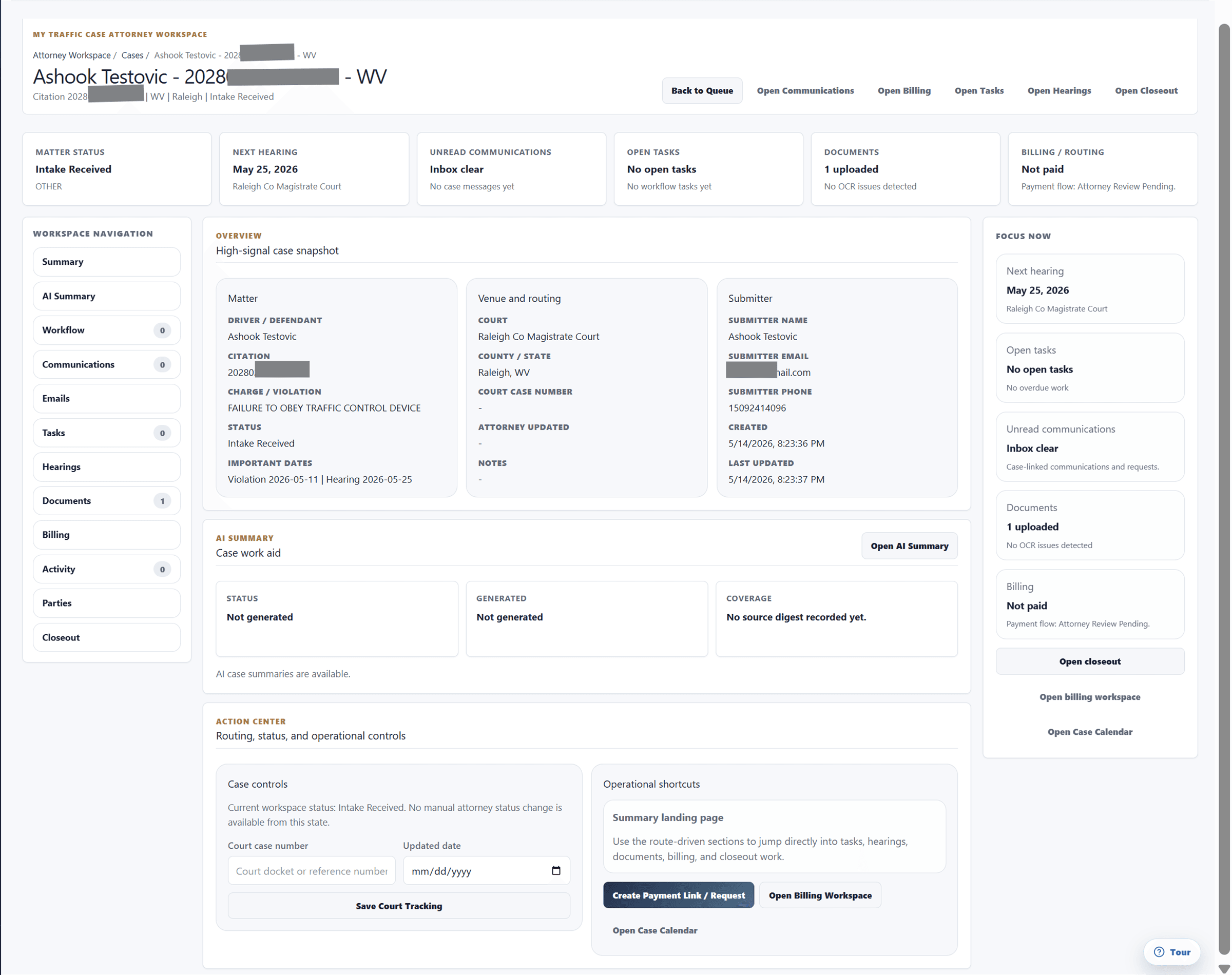
Built for attorney case workspaces with case facts, activity, documents, billing, and follow-up in one matter record.
Sanitized attorney case workspace showing summary, action center, and case sections.

Audience

Who it is for

Traffic-ticket attorneys, firm staff, and operations teams managing citation-centered case work.

Problem

What it fixes

Traffic-ticket work gets harder when the ticket, status, payment, documents, communication, and next action live in separate systems.

How it works

Workflow steps

  1. Review case facts
  2. Check next step
  3. Open required section
  4. Complete action
  5. Record outcome
Workflow

Review before action

Summary and focus areas keep case posture, billing, documents, dates, and messages readable before the attorney acts.

  • Review case facts
  • Check next step
  • Open required section
  • Complete action
Workflow

Closeout discipline

Disposition and post-court obligations stay attached to the matter instead of becoming a separate checklist.

  • Record outcome
  • Attach disposition document
  • Track obligations
  • Complete closeout

Capabilities

What this workflow covers

  • Shared attorney case workspace sections for Summary, AI Summary, Workflow, Communications, Emails, Tasks, Hearings, Documents, Billing, Activity, Parties, and Closeout.
  • Header shortcuts for messaging, billing, AI driver statement or summary, tasks, hearings, and closing a case.
  • Summary action center for status, court case number, attorney date, payment link, driver access, and fleet case monitoring.
  • AI case summary workflow to generate, refresh, clear, or view cached summaries.
  • AI summary inputs can include case facts, notes, messages, documents, document requests, tasks, email threads, and activity.
  • AI output can include posture, timeline, critical dates, risks, next steps, missing items, and a client-update draft.
  • Workflow steps can be marked complete or reopened, with primary attorney step controls and jury or trial-prep panel where applicable.
  • Communications actions for agency, fleet, attorney, driver, all participants, quote/update requests, signed document requests, and participant invites.
  • Emails section for linked threads, filters, and email context associated with the case.
  • Tasks, hearings, documents, billing, parties, and closeout sections keep follow-up, court, files, payments, metadata, disposition, and post-court obligations together.
  • Closeout supports structured requirements plus legacy logistics for mailed fines, payment cashed, FedEx received, checks, tracking, and broker closeout.

Traffic-ticket value

Why it matters for citation work

The value is keeping traffic-ticket work organized around the citation and the next case step instead of a generic matter record.

Related links

FAQ

Is workspace available to every user?

Built for attorney case workspaces with case facts, activity, documents, billing, and follow-up in one matter record.

How does workspace help traffic-ticket work?

Keep attorney case work anchored to the citation while exposing the sections and shortcuts needed for status, court, payment, client, fleet, document, and closeout decisions.